Ad Platform Integrations
Connect CallScaler with Google Ads, Meta Ads, and Microsoft Ads to track offline call conversions.
How It Works
When a visitor clicks one of your ads, the ad platform attaches a click ID to the URL (gclid for Google, fbclid for Meta, msclkid for Microsoft). If that visitor calls your tracking number, CallScaler captures the click ID and reports the call back to the ad platform as an offline conversion. This closes the loop between ad spend and phone calls, letting the platform optimize for calls — not just clicks.
Google Ads, Meta Ads, and Microsoft Ads each appear as their own card in the Integrations row at the top of Extensions. Each card opens a connect dialog that captures credentials and qualification filters.
Ad conversion tracking requires website tracking (DNI) to capture click IDs from visitor URLs. Without DNI, CallScaler has no way to match a call to a specific ad click.
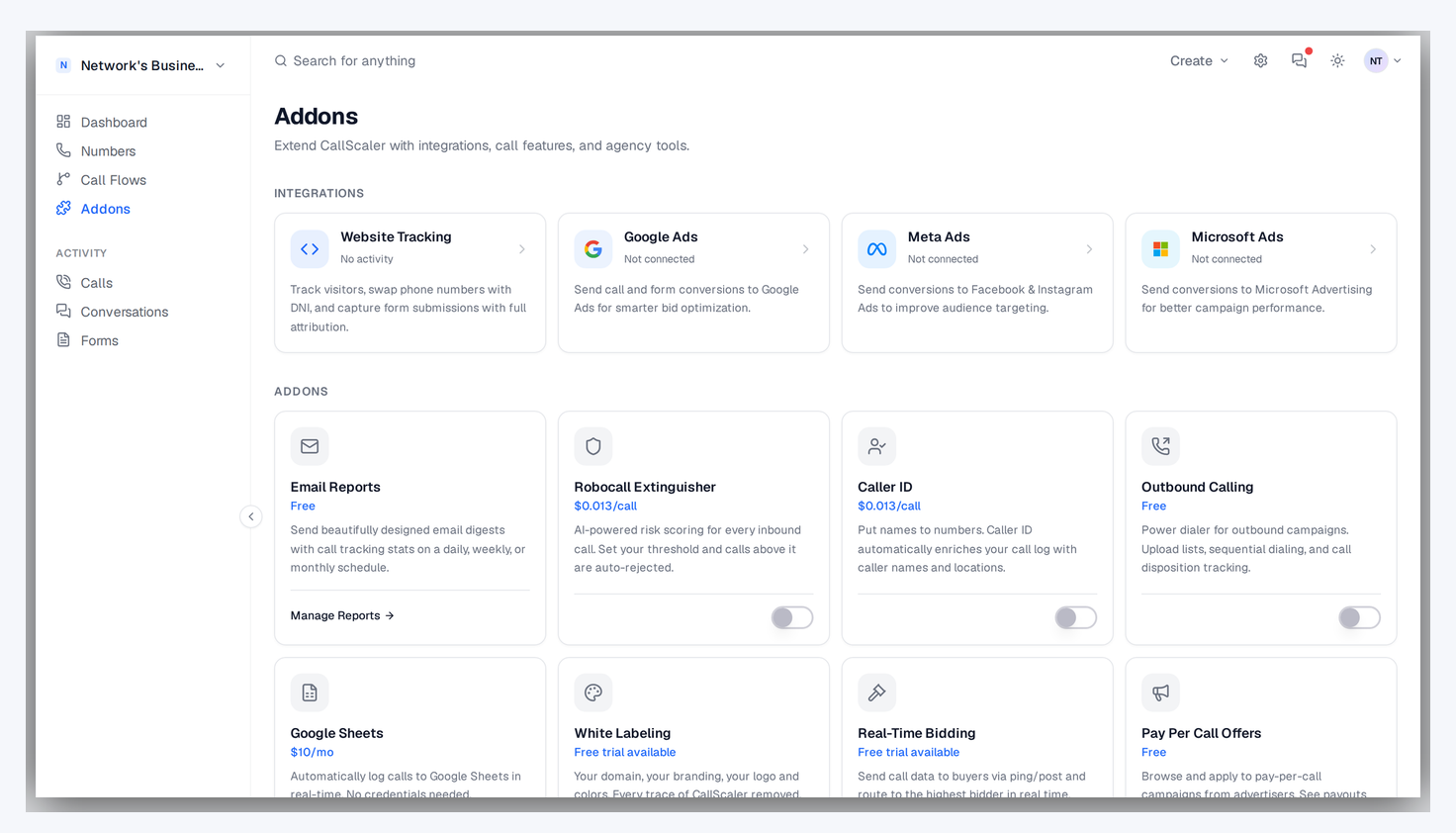
Connecting Google Ads
1. Go to Extensions and find the Google Ads card in the Connect section.
2. Click Connect and fill in the required fields:
Customer ID — Your Google Ads account ID (format: 123-456-7890). Find it in Google Ads under Settings → Account settings.
Conversion Action ID — The tag for the specific conversion action you want to track (format: AW-123456789/AbCdEfGhIjKl). Find it in Google Ads under Goals → Summary.
Access Token — A Google Ads API access token. Generate one through the Google Ads API Center or an OAuth flow.
3. Optionally add a Refresh Token for automatic token renewal.
4. Click Save. CallScaler will begin reporting qualifying calls as offline conversions.
You can also set an Account Name to label the integration for your own reference — useful if you manage multiple Google Ads accounts.
Connecting Meta Ads
1. Go to Extensions and find the Meta Ads card.
2. Click Connect and fill in:
Pixel ID — Your Meta Pixel ID (a 15-digit number). Find it in Meta Business Manager under Data Sources → Pixels.
System User Access Token — A long-lived access token from a System User. Generate one in Meta Business Settings → System Users.
3. Click Save. CallScaler sends call conversions to Meta via the Conversions API using the fbclid captured from visitor URLs.
Connecting Microsoft Ads
1. Go to Extensions and find the Microsoft Ads card.
2. Click Connect and fill in:
Account ID — Your Microsoft Advertising account ID. Find it in Microsoft Ads under Settings → Account and Billing.
UET Tag ID / Goal ID — The ID of the conversion goal you want to track. Find it in Microsoft Ads under Conversion Tracking → Goals.
Access Token — A Microsoft Ads API access token generated through their authentication flow.
3. Click Save. CallScaler reports qualifying calls as offline conversions using the msclkid.
Qualification Filters
Each integration lets you set filters so only high-quality calls are reported as conversions. This prevents short or spam calls from polluting your ad platform data.
Available filters:
Minimum Duration — Only report calls longer than a set number of seconds. Preset options: 30s, 60s, 90s, 120s, or enter a custom value.
Minimum AI Score — Only report calls with an AI intelligence score above a threshold. Preset options: 50, 60, 70, 80, or enter a custom value.
You can enable one or both filters. When both are active, a call must meet both criteria to be reported (e.g., Duration ≥ 60s + AI Score ≥ 70).
Start with Duration ≥ 30s and AI Score ≥ 50, then tighten the thresholds as you review your call quality data.
Conversion Value
You can assign a dollar value to each conversion reported to the ad platform. This tells Google, Meta, or Microsoft how much a phone call is worth to your business, enabling value-based bidding strategies.
Set the conversion value in the integration settings when connecting or editing a platform. Leave it at $0 if you don't need value-based optimization.
Testing and Managing Integrations
After connecting a platform, you can:
Test — Send a test conversion to verify your credentials and configuration are working. The test button is available on each connected integration card.
Edit — Update credentials, qualification filters, or conversion values at any time.
Disconnect — Remove the integration entirely. This stops all future conversion reporting for that platform but does not affect historical data already sent.
If your access token expires or is revoked, conversions will fail silently. Check your integration status periodically, especially after changing ad platform credentials.
Related
On this page