
Call Recording with AI Transcription on All Plans

Automatically record inbound and outbound calls. Play back recordings from the dashboard, download for compliance, and use AI to transcribe and summarize every conversation.

The bottom line

Last updated: February 2026

CallScaler includes call recording on all plans with no per-minute recording fees. Every recorded call is automatically transcribed with speaker diarization and summarized by AI. Compliance announcements ('this call may be recorded') can be enabled per number or account-wide. Recordings are encrypted at rest and in transit with configurable retention. Many competitors charge per-minute recording fees on top of their base plan, making CallScaler significantly cheaper at scale.

How it works

Every call captured, transcribed, and analyzed automatically.

01

Enable Recording

Toggle call recording on per number, call flow, or account-wide. Configure compliance announcements.

02

Calls Are Recorded

Every call is recorded in high quality and stored securely. Recordings are available within seconds of the call ending.

03

Play & Review

Listen to recordings directly in the dashboard. Jump to any point in the call, adjust playback speed.

04

AI Processes

Recordings are automatically transcribed, summarized, and scored by AI. No manual review needed.

Call Recording in CallScaler

Key capabilities

Secure recording with AI-powered insights built in.

Automatic Recording

Record all calls or selectively by number, call flow, or route. Toggle on/off anytime.

Compliance Announcements

Play a 'this call may be recorded' message automatically. Stay compliant with state and federal laws.

Download & Export

Download individual recordings or bulk export. Store in your own systems for compliance.

AI-Powered Analysis

Every recording is automatically transcribed and summarized. Search across all calls by keyword.

Secure Storage

Recordings encrypted at rest and in transit. Configurable retention policies.

Playback Controls

Variable speed playback, skip silence, and jump to key moments identified by AI.

Try Call Recording free

No credit card required. Set up in under 60 seconds.

Who uses call recording?

Teams that need to review calls for quality, training, or compliance.

Sales managers coaching reps with real call examples
Legal and compliance teams maintaining call records
Pay-per-call networks verifying call quality for billing disputes
Customer success teams reviewing support interactions

Why call recording matters beyond compliance

Most businesses think of call recording as a compliance requirement, but the real value is in what you do with the recordings. CallScaler automatically transcribes, summarizes, and scores every recorded call using AI. This turns recordings into searchable, actionable data. Sales managers can review calls without listening to hours of audio. Agency owners can report on call quality to clients using AI summaries instead of manual spot checks. The recording is the raw material; AI turns it into intelligence.
Compliance and consent announcements

Recording laws vary by state. Some states require one-party consent (only one person on the call needs to know), while others require all-party consent (everyone must be informed). CallScaler includes a built-in compliance announcement that plays 'this call may be recorded for quality assurance' before connecting the caller. You can enable this per number or account-wide. You can also upload custom audio for the announcement or use text-to-speech. Always consult your legal team about recording requirements in your operating states.

What happens after a call is recorded

Every recording triggers a chain of automatic processing:

  • AI transcribes the full conversation with speaker labels (caller vs agent)
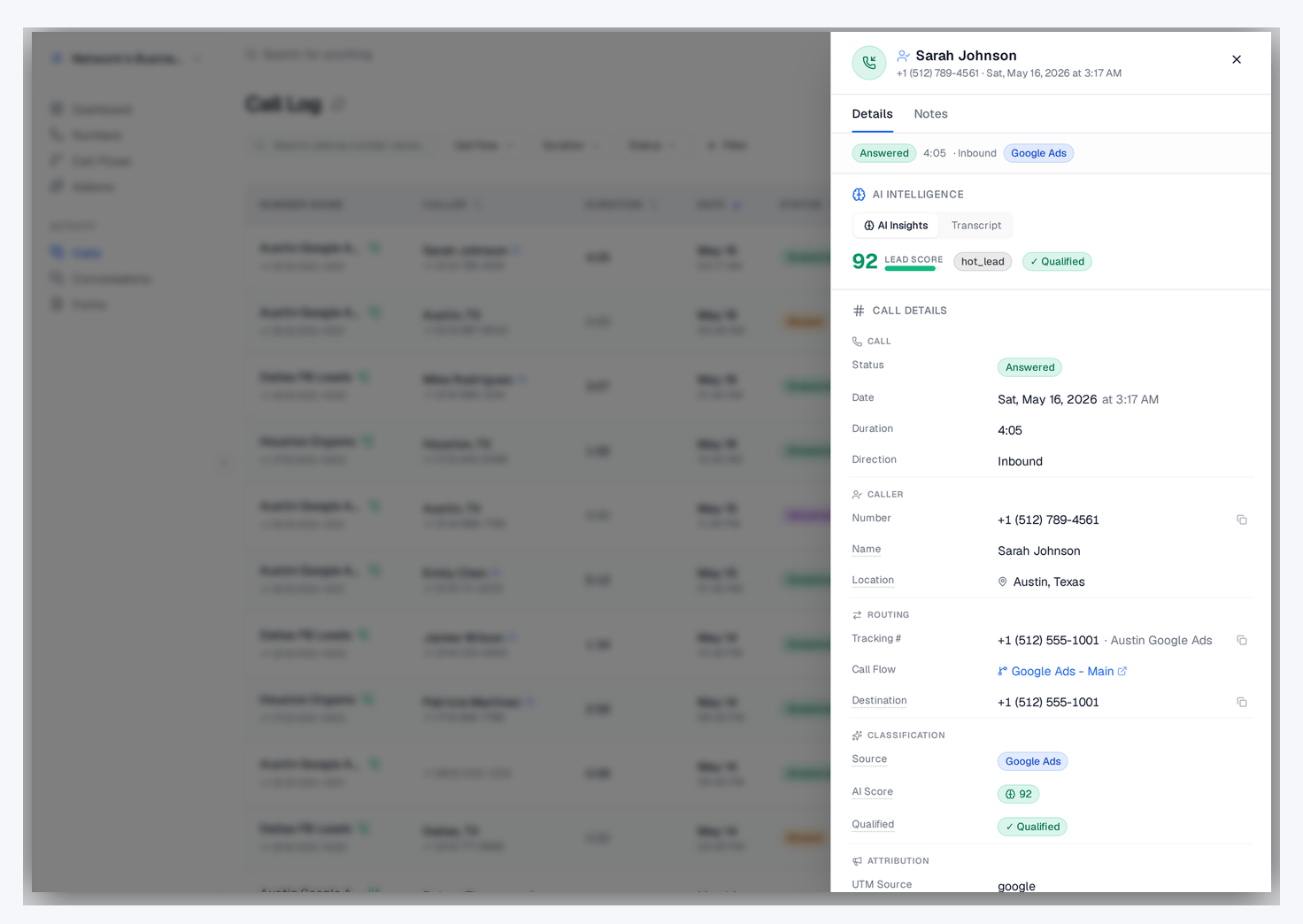
  • An AI summary captures the key points, caller intent, and outcome in one paragraph
  • Lead scoring evaluates the call on a 0 to 100 scale based on buyer intent signals
  • The recording, transcript, summary, and score appear together in the call log
  • Keyword search across all transcripts lets you find any conversation by topic
  • Webhook events deliver all this data to your CRM or automation tools in real time

Using recordings for sales coaching

Call recordings are one of the best sales coaching tools available:

  • Filter by lead score to find calls where reps missed high-value opportunities
  • Compare talk ratios between top performers and reps who need coaching
  • Search transcripts for specific objections to build training materials around common scenarios
  • Use AI-flagged coaching opportunities to identify calls worth reviewing
  • Share specific call recordings with reps as examples of what good (or bad) looks like
  • Review calls weekly as a team to build a culture of continuous improvement

Storage, security, and retention

CallScaler encrypts recordings at rest and in transit. You can configure retention policies to automatically delete recordings after a set period if your compliance requirements demand it. Individual recordings can be downloaded for offline storage, and bulk export lets you archive large volumes of calls to your own systems. For businesses in regulated industries, this combination of cloud storage with configurable retention and export options covers most compliance scenarios.

Call recording compared to manual note-taking

Sales teams that rely on manual call notes miss details, introduce bias, and spend time writing instead of selling. Call recording with AI transcription captures every word automatically. The AI summary gives you the key points without listening to the full recording. Reps can focus entirely on the conversation knowing that everything is documented. For managers reviewing calls, AI analysis is faster and more consistent than reading handwritten notes.

Recording settings and configuration

Set up call recording to match your business needs:

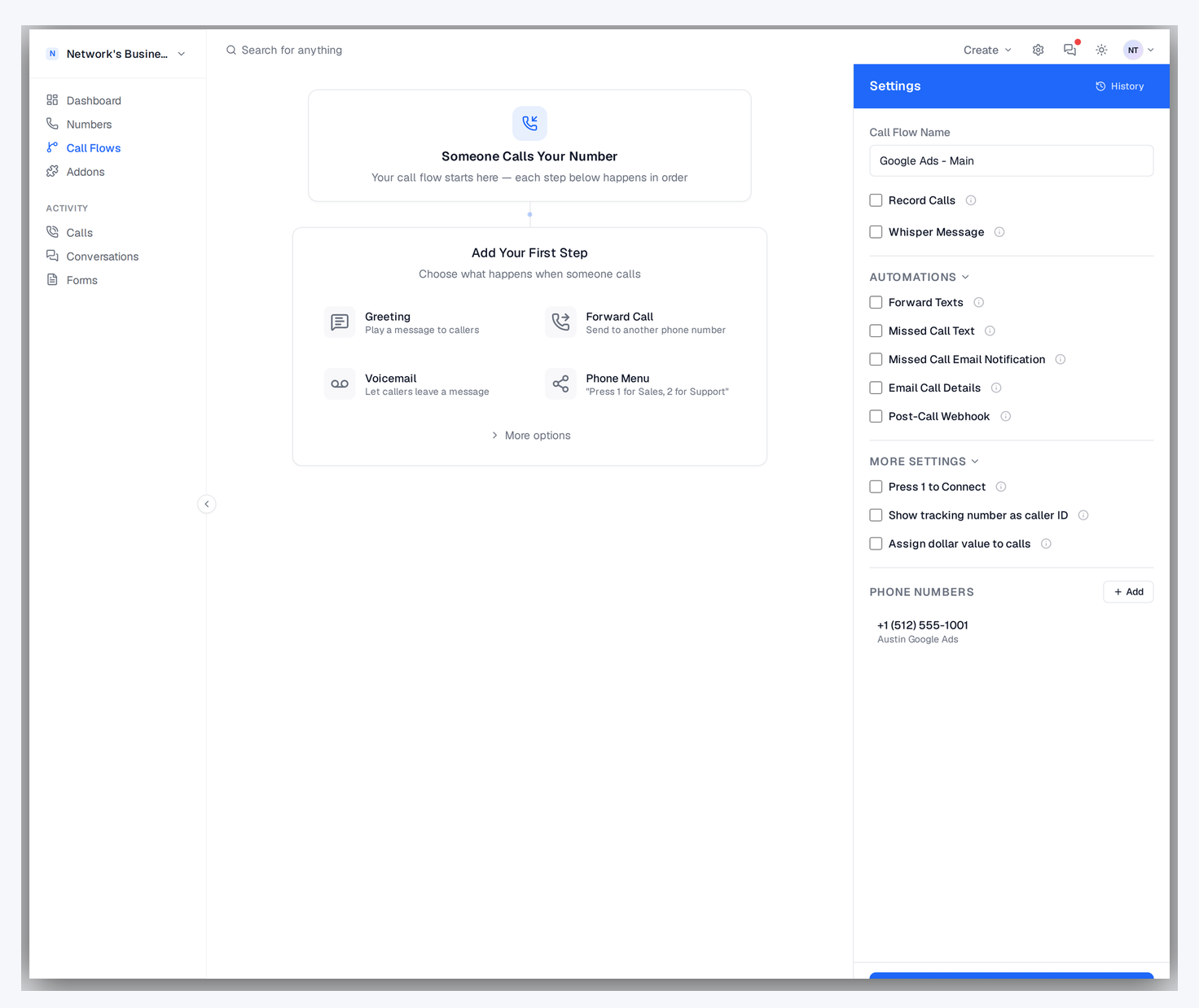
  • Enable recording account-wide or selectively per tracking number or call flow
  • Toggle compliance announcements on for states requiring all-party consent
  • Set retention policies to auto-delete recordings after your required period
  • Download recordings individually or use bulk export for large archives
Recording settings and configuration

Integrating recordings with your existing tools

Get recording data into the systems your team already uses:

  • Webhook events include recording URLs so your CRM can link directly to call audio
  • Google Sheets integration logs recording links alongside other call data in real time
  • Export recordings in bulk for import into compliance or quality management systems
  • Share recording links with clients via portals so they can review call quality themselves

Frequently asked questions

Common questions about Call Recording.

Ready to try Call Recording?

Sign up free and get started in under 60 seconds. No credit card required.