Call Log with Recordings, Transcripts, and AI Summaries
A comprehensive log of every call with recording, transcript, AI summary, lead score, source data, and caller information. Filter, search, export, and take action on any call in seconds.
CallScaler's call log gives you a complete record of every call with recording playback, full transcript, AI summary, lead score (0 to 100), source attribution, and caller details, all in one view. You can search full-text across transcripts, filter by 20+ fields (multi-select chips), and export any filtered view to CSV. Inline playback and click-to-callback let you act on calls without leaving the log. CallTrackingMetrics charges $399 a month for comparable filter depth; CallScaler bundles it free on every plan.
Written by Curran Van Waarde, Founder, CallScaler
Quick facts about Call Log
Price
Free on every plan
Filters
20+ pinnable + multi-select
Search
Full-text across transcripts
Export
CSV (per filter view)
Retention
Unlimited (5-year addon for compliance)
Click-to-callback
Yes
In-depth guide to Call Log
Everything about a call in one place
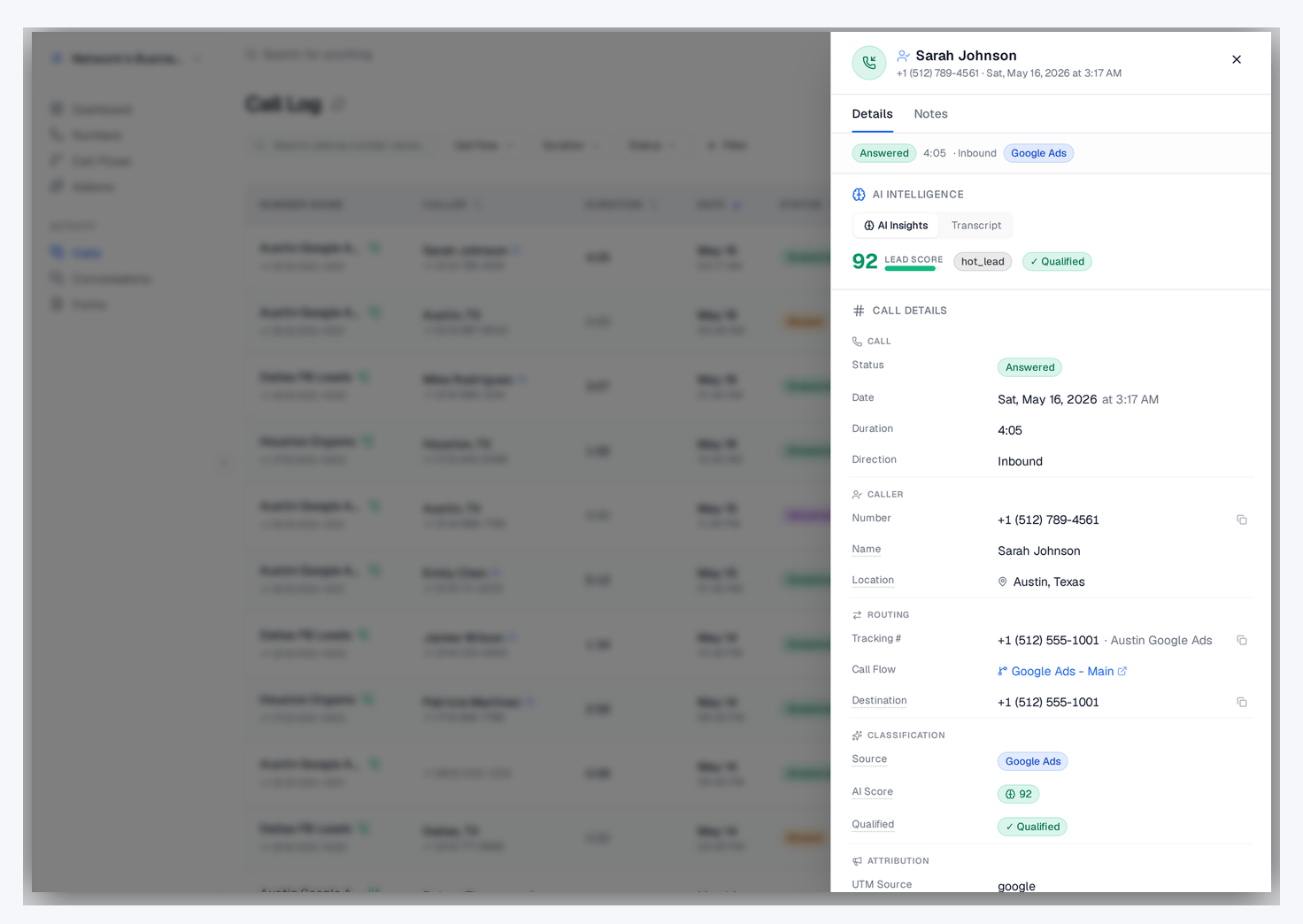
Click any call in the log and you see everything: the full recording with playback controls, the AI transcription with speaker labels, the AI summary explaining what the caller wanted, the lead score from 0 to 100, the source attribution (which campaign, keyword, and landing page), caller ID, location, duration, and any tags or notes. This single view eliminates the need to jump between tools to understand a call.
Call detail sheet with AI Insights tab showing summary, lead score, key moments, and full transcript
Search and filter for specific calls

The call log supports full-text search across transcriptions, so you can search for 'roof repair' and find every call where someone mentioned roofing. Filter by date range, source, campaign, answered or missed status, minimum lead score, call duration, and phone number. You can combine these filters to create very specific views like 'all qualified Google Ads calls over 2 minutes in the last 30 days'.
Call log with multi-select filter chips, full-text search, and 11 rows of attribution-rich call records
Exporting call data
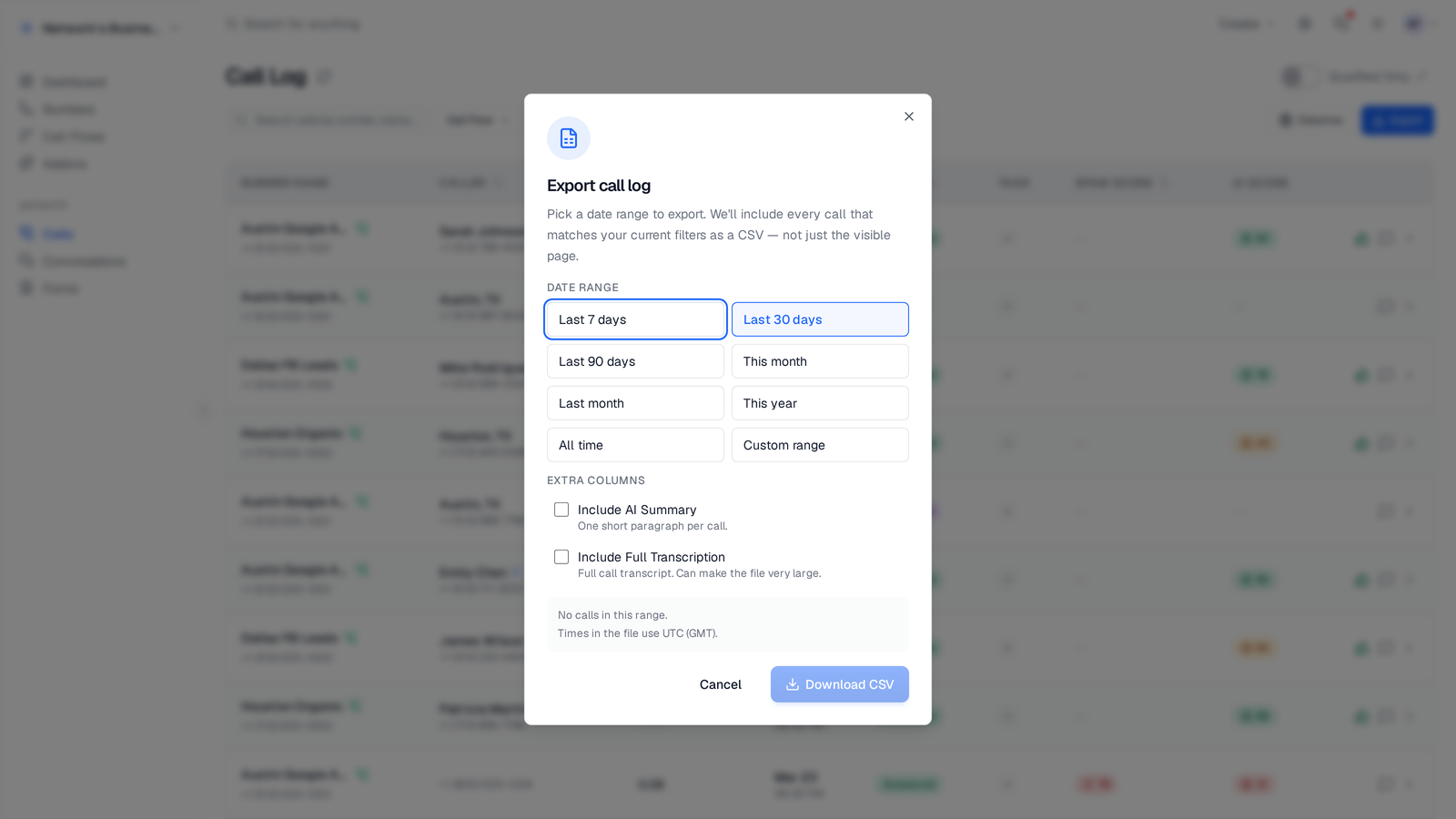
Export any filtered view to CSV with all call fields including recording URLs, transcription text, AI summaries, lead scores, and source data. The export includes every column visible in the log plus additional metadata. Use exports for client reporting, compliance records, or to feed data into external analytics tools.
CSV export modal with field picker and date range, ready to download a filtered call log
How the call log fits into your workflow
Most teams check the call log daily to review missed calls, listen to recordings of high-value leads, and spot quality issues. Sales managers use the lead score filter to identify hot leads that need immediate follow-up. Agency account managers use it to pull client-specific call data for monthly reports. The call log is the operational center of your call tracking setup.
Call log for quality assurance
Use the call log to maintain consistent call quality:
Filter by lead score to find calls where high-value leads may have been mishandled
Listen to recordings of missed calls to understand why they went unanswered
Read AI summaries to spot-check call quality without listening to every recording
Search transcripts for specific phrases to verify agents follow scripts
Advanced call log filtering
Combine filters to answer specific business questions:
Show only missed calls from Google Ads in the last 7 days to quantify lost leads
Filter for calls scoring 80+ to review your hottest leads for follow-up
Search for competitor mentions across all calls to understand your competitive position
Filter by specific tracking numbers to review performance of individual campaigns
Call log tips for pay-per-call networks
Pay-per-call operators use the call log to verify billing, resolve disputes, and monitor network quality. Filter by buyer to see all calls routed to a specific partner. Check lead scores and AI summaries to validate that calls meet quality criteria. Export filtered call data for billing reconciliation. The call log provides the objective record both buyers and publishers need to trust the network.
Getting the most from your call log
Set up a daily routine: first, check missed calls and follow up immediately. Then scan AI summaries of completed calls to spot any issues. Review lead scores to identify your best leads of the day. Finally, check the source breakdown to see which campaigns are performing. This 5-minute daily review keeps you on top of every lead and campaign without getting buried in recordings.
How it works
Every call, fully documented, instantly searchable.
01
Calls Logged Automatically
Every inbound call appears in the log immediately with all associated data.
02
Enrich with AI
Recordings are transcribed, summarized, and scored. All data is attached to the call record.
03
Search & Filter
Find any call by phone number, source, date, score, duration, or keyword in the transcript.
04
Take Action
Play recordings, read transcripts, download data, or click to call back — all from the log.
Call log table showing every call tagged by tracking number, with caller, duration, date, status, spam score, and AI lead score columns
Key capabilities
A complete record of every call that came in.
Complete Call Records
Every call shows: caller ID, source, duration, recording, transcript, summary, and lead score.
Powerful Search
Search by phone number, caller name, transcript keyword, or any field.
Smart Filters
Filter by date range, source, score range, duration, answered/missed, and more.
Bulk Export
Export filtered results to CSV. Include recordings, transcripts, or just metadata.
Click-to-Call
Call back any lead directly from the call log with one click.
Inline Playback
Play recordings and read transcripts without leaving the call log view.
Call log compared
Provider
Price
Full-text transcript search
Multi-select filters
Click-to-callback
CallScaler (every plan)
Free
Yes
Yes
Yes
CallRail (Marketing)
$95/mo
Yes
Single-select
Yes
WhatConverts (Pro)
$30/mo
Yes
Yes
No
CallTrackingMetrics (Enterprise)
$399/mo+
Yes
Yes
Yes
Pricing as of May 2026. CallScaler's multi-select filters and full-text transcript search ship on every plan.
Who uses the call log?
Anyone who needs to review, search, or act on past calls.
Sales reps reviewing their daily calls and following up on leads
Managers auditing call quality and agent performance
Billing teams verifying call records for pay-per-call invoicing
Compliance officers pulling call records for audits