Best Call Tracking for Digital Marketers
Close the attribution gap on phone calls. Track every call back to the campaign, keyword, and landing page that drove it — then feed that data back to ad platforms for smarter optimization.
The Challenge
Half Your Conversions Are Invisible
Half your conversions are invisible to ad platforms
Phone calls — often the highest-value conversion — are a black hole. Google Ads and Meta can't optimize for conversions they can't see. You end up cutting campaigns that actually generate the most revenue.
No way to optimize for call quality
Not all calls are equal. Without AI scoring, you feed ad platforms a binary signal — call or no call — when you need quality-weighted values. Algorithms optimize for volume, not value.
Multi-touch attribution breaks without call data
A prospect sees your Facebook ad Monday, clicks Google Ads Wednesday, calls Saturday. Without call tracking, you credit Direct and miss the channels that actually drove the conversion.
The Solution
How Digital Marketers Use CallScaler
Assign unique tracking numbers to every channel, let AI score your leads, and route calls so none slip through the cracks. See pricing plans, call recording, and AI transcription.
- Full-Funnel Call Attribution with Click ID Matching
DNI captures gclid, fbclid, msclkid, and UTM parameters from every visitor. When they call, the conversion is matched to the original click and sent back to the ad platform automatically.
- AI Lead Scoring for Quality-Based Optimization
Every call is scored 0-100 by AI. Import scores as conversion values in Google Ads for value-based bidding. The algorithm learns to find high-value callers, not just more callers.
- Keyword and Ad Group Level Call Data
See which exact keywords and ad groups drive phone calls — not just clicks. Reallocate budget based on actual call volume and lead quality at the keyword level.
- Cross-Channel Comparison in One Dashboard
View call performance across Google Ads, Meta, Microsoft Ads, organic, email, and offline in one place. Compare cost per qualified call by channel.
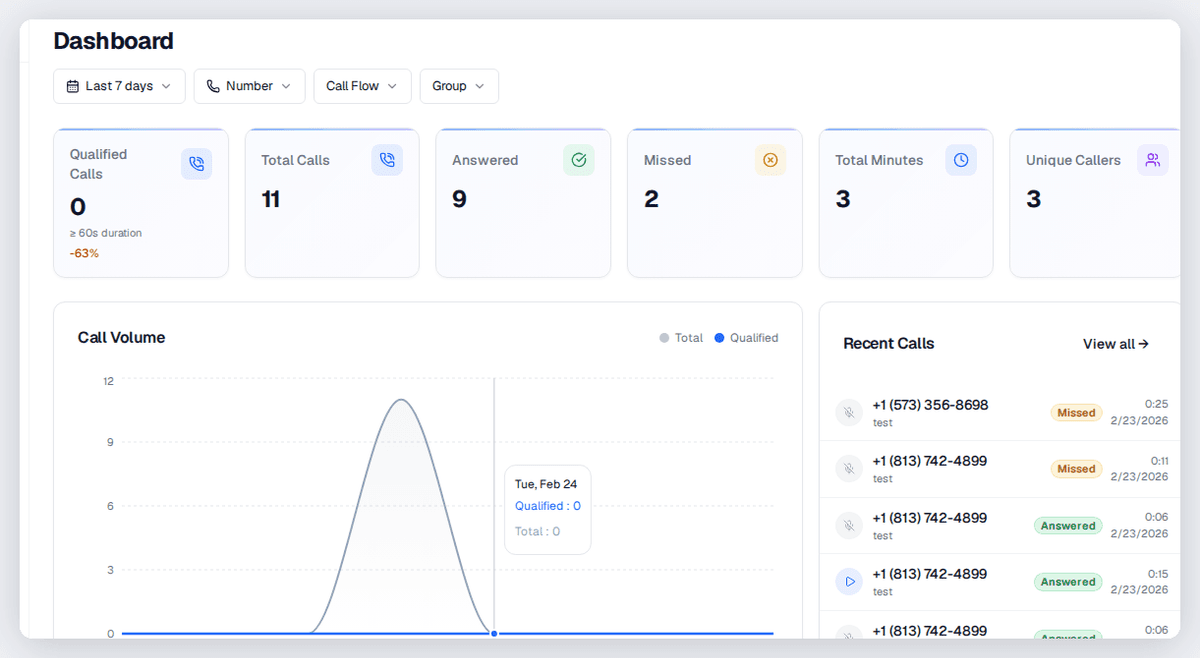
See where your calls really come from
Free to start. No credit card required. Tracking live in under 2 minutes.
“Feeding call conversions into Google Ads transformed our clients' Smart Bidding. The algorithm stopped chasing form-fill clickers and started finding phone callers. Average cost per qualified lead dropped 38% across our portfolio in 60 days.”
Getting Started
How It Works
Get started in under 5 minutes. No credit card required.
Install the DNI Snippet
Add one JavaScript tag to your site. It detects every visitor's source and captures click IDs from Google, Meta, and Microsoft.
Route Calls to Your Client
Tracking numbers forward to any destination with IVR, multi-ring, or schedule-based rules. Clients answer their normal phone.
Feed Conversions to Ad Platforms
Call data flows back to Google Ads, Meta, and Microsoft Ads automatically. Smart Bidding optimizes for phone leads, not just clicks.
Call Tracking for Digital Marketers
Call Tracking Software for Digital Marketers
Everything you need to track, route, and analyze phone calls. Purpose-built for digital marketers.
Dynamic Number Insertion (DNI)
A JavaScript snippet detects each visitor's source and swaps in the matching tracking number. Captures gclid, fbclid, msclkid, and UTM parameters automatically.
Google Ads Offline Conversion Import
Call conversions sent to Google Ads via API with gclid matching. No CSV uploads. Smart Bidding learns from real call data within hours.
Meta Conversions API Integration
Server-side call events pushed to Meta's Conversions API. Not affected by browser privacy changes or ad blockers.
AI Scoring with Conversion Value
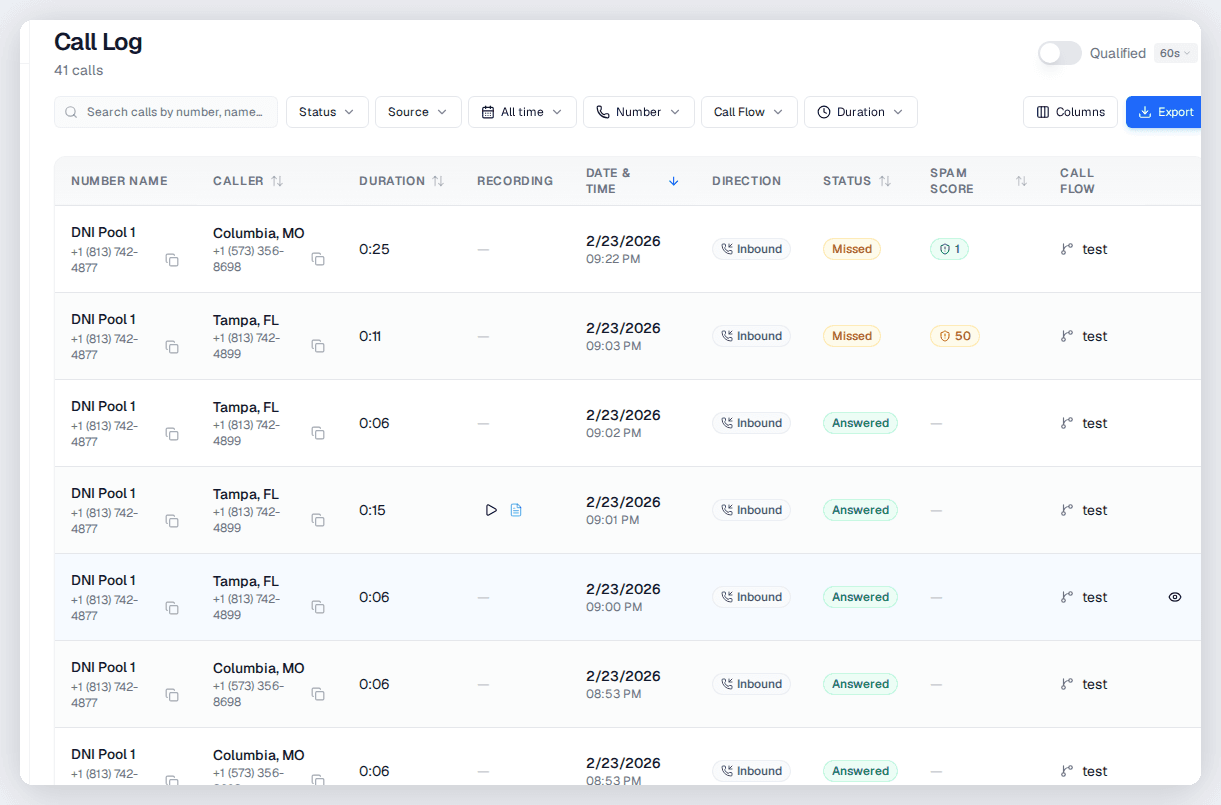
Every call scored 0-100 with summaries and categories. Use scores as conversion values for value-based bidding in any ad platform.
Webhook and API Integration
Push real-time call data to CRMs, BI tools, Zapier, Make.com, or custom apps via webhooks. Full REST API for programmatic access.
Cross-Channel Reporting Dashboard
View calls from every traffic source in one dashboard. Filter by source, campaign, keyword, and lead score. Export to Sheets or pull via API.
Common Questions
Frequently Asked Questions
How does Dynamic Number Insertion work technically?
A lightweight JavaScript snippet loads on your website and detects each visitor's traffic source by reading URL parameters (gclid, fbclid, UTM tags) and referrer data. It dynamically swaps your displayed phone number with the corresponding tracking number from your number pool. The visitor's source data is stored in a cookie, so if they call days later, the attribution is preserved. The snippet adds minimal page load time and works on all major CMS platforms.
How do call conversions get into Google Ads?
When a visitor from Google Ads calls your tracking number, CallScaler captures the gclid that was stored during their website visit. The call conversion — including timestamp, duration, and optionally the AI quality score as a conversion value — is sent to Google Ads via the offline conversion import API. Conversions typically appear in your Google Ads reports within 3-6 hours.
Can I send call conversions to Meta and Microsoft Ads too?
Yes. For Meta, call events are pushed to the Conversions API with the fbclid, enabling Facebook and Instagram campaign optimization for phone leads. For Microsoft Ads, conversions are sent with the msclkid. All three integrations work simultaneously, so a single call tracking setup feeds all your ad platforms.
How is this different from Google's call extensions and call-only ads?
Google's native call tracking only measures calls made directly from the ad unit itself. It cannot track calls that happen after someone clicks through to your website, browses multiple pages, and then calls. CallScaler tracks the full journey from ad click through website visit to phone call — capturing calls that Google's native tracking completely misses. For most businesses, website calls outnumber ad-direct calls by 3-5x.
What ad platforms and tools does CallScaler integrate with?
CallScaler integrates natively with Google Ads, Meta/Facebook Ads, and Microsoft Ads for conversion tracking. Webhooks connect with Salesforce, HubSpot, Zapier, Make.com, and any platform that accepts webhook data. The Google Sheets connector provides simple spreadsheet-based reporting. The REST API gives full programmatic access for custom integrations with BI tools, data warehouses, and proprietary platforms.
How many tracking numbers do I need for DNI?
For DNI to work effectively, you need a pool of numbers — typically 1 number per 50-100 concurrent website visitors. Most businesses start with a pool of 5-10 numbers and scale based on traffic volume. CallScaler's number pools automatically manage assignment and recycling. Numbers start at $0.50/mo each, making it economical to maintain adequate pool sizes.
Call Tracking for Other Industries
Marketing Agencies
Best call tracking software for marketing agencies. White-label dashboards, unlimited clients, AI scoring — starting at $0/mo.
Home Services
Best call tracking for home services. Track calls from Google Ads, Local Services Ads, Yelp, and offline sources. AI scoring, attribution, and ROI reporting starting at $0/mo.
Law Firms
Best call tracking software for law firms. Track legal leads, monitor intake, score calls by case type. Starting at $0/mo.
Small Businesses
Best call tracking for small businesses. Start at $0/mo, track calls from every ad, and measure real marketing ROI.
Plumbing Companies
Best call tracking for plumbers. Track emergency and service calls, route after-hours, measure marketing ROI. Starting at $0/mo.
Roofing Companies
Best call tracking for roofers. Track storm damage leads, optimize Google Ads, route calls to sales teams. Starting at $0/mo.
Close the Attribution Gap on Phone Calls
Sign up free, get your first tracking number, and see exactly where your calls come from. No credit card required.